GET CONTROL OF YOUR MAINTENANCE

Companies of all sizes use Smartspanner CMMS to manage maintenance and compliance; from hotels and theme parks to manufacturing and aerospace.

BOOK A DEMO 14 Day Free Trial

Benefits of CMMS

Cloud CMMS software is easy to set up and get started. Benefits of any CMMS software will only be realised if you and your team have an easy to use and reliable platform.

Improve Productivity

Improve scheduling, planning and priorities to ensure work is done at the right time by the right person.

Stay in control with real time data

Cloud software, mobile or tablets allows your team to update work in real time.

Easy to use software

Our 45 minute demo is enough to start using Smartspanner and set up your team with digital maintenance management.

Unlimited online support

We are so confident you will find Smartspanner easy to use, we offer unlimited online and telephone support.

Boost Performance with QR/Barcode Scanning

Improve accuracy and speed up workflows

  • Create Asset and Spares Labels in Smartspanner
  • Link with 3rd party labelling
  • Scan to look up assets, select assets and filter work orders
  • Scan to look up spares and add spares to work orders
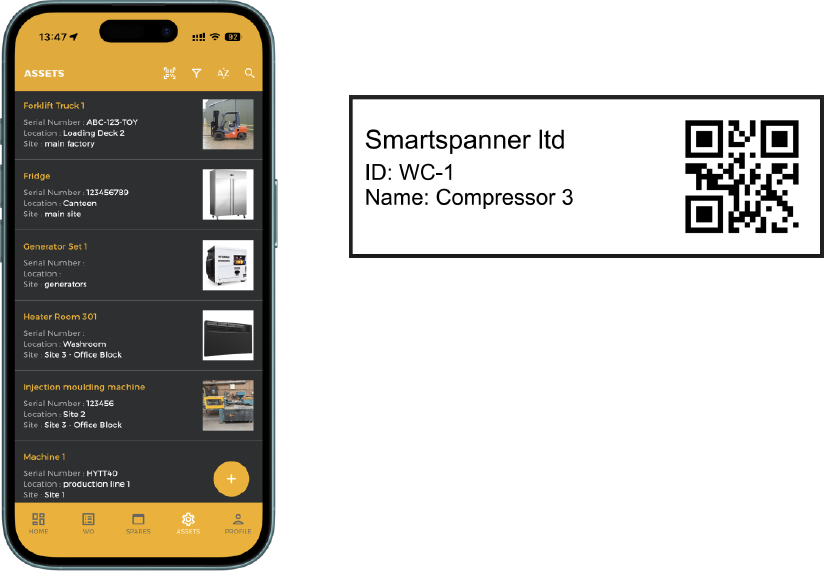
QR Code Scanning

Industries

Smartspanner is adaptable to many industries. Our clients include hotels, aerospace, fisheries, power generation and theme parks!

Manufacturing

Asset availability and reliability is critical to manufacturing operations. Smartspanner features include statistics to monitor trends and reliability.

Facilities Management

Hotels, serviced apartments, restaurants and offices benefit from mobile CMMS applications and easy multi-site deployment.

Energy and Resources

Increasing number of micro power-generation, biomass and wind turbine sites benefit from CMMS software. Managing processes for fisheries, mining and utilities can all be achieved.

Distribution

Multi-site depots, distribution and fleet management with simple to use maintenance software designed for small business.

Features

Works Order Scheduling

Create and schedule tasks for your team. Set-up recurring schedules for Preventative Maintenance, Inspections and Servicing.

Learn more

Asset Management

Look up Asset history, linked spares and file repository. Group Assets by Site, location and asset hierarchy.

Learn more

Check Lists & Inspections

Create checklists and inspection routines to capture responses to all items with comments and media.

Learn more

Spare Parts & Inventory

Spares part inventory management, Low stock alerts on dashboard. Export stock report to excel.

Learn more

Condition Based Monitoring

Monitor parameters for each asset to decide when to perform maintenance.

Learn more

Dashboard and Alerts

Dashboard to track overdue works orders, work requests, overdue and more. Alerts for inspection failures and low inventory of spare parts.

Learn more

Works Order Management

Centralise your teams work with works order management system.

  • Assign tasks to your team
  • Manage works order schedule and priorities
  • Work in real time with dashboard updates and email alerts
  • Manage maintenance request
Work Order Management

Preventative Maintenance

Schedule preventative works orders to manage routine work at set intervals and automatic scheduling to your team and working days.

  • Manage recurring schedules
  • Maintain assignment to the same team member
  • Dashboard management and email alerts so nothing is forgotten about
Preventative Maintenance

Compliance

  • Ensure health and safety is up to date with routine inspections
  • Managing compliance and audit records with online history
  • Support your ISO and auditing requirements with a centralised database
Compliance

Mobile Maintenance System

No installation or set up required, just login anywhere, anytime with an internet connection and browser.

  • Applications for Android and iOS
  • Desktop access anywhere, anytime
  • Tablets to stay flexible and mobile
Mobile Maintenance

Testimonials

Baris C.

Support Engineer

Very user friendly interface, which takes 5 minutes to understand it completely and you can start using it without hesitation. There is no useless tabs which makes everything complicated, only necessary components of CMMS are included.

Joe W.

Engineering Manager

A quick, simple to use CMMS system that is ideal for the organisation size we work within.

Andrew G

Maintenance Manager

Simple, flexible, no nonsense, everything in one package - no extras